
You’ve started a blog, you’re publishing posts — but Google isn’t sending you any visitors. Sound familiar?
Most beginner bloggers make the same mistake: they write content and hope Google finds it. But SEO doesn’t work on hope. It works on a system. And the great news is that blog SEO for beginners doesn’t require a computer science degree or an expensive agency. It requires understanding a handful of fundamentals and applying them consistently.
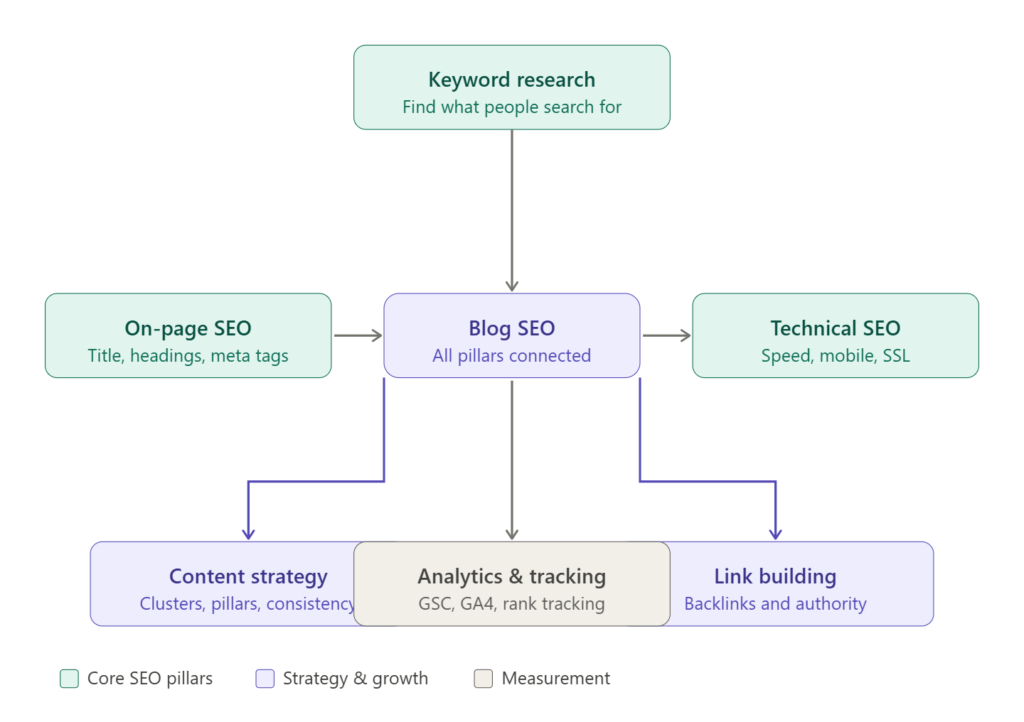
This guide covers everything you need — from keyword research and on-page SEO to content strategy and link building — in plain, actionable language. By the end, you’ll know exactly what to do on every post you publish to give it the best possible chance of ranking on page one.
What Is Blog SEO?
Blog SEO is the practice of optimizing your blog posts so they rank higher in search engine results pages (SERPs). It involves choosing the right keywords, structuring your content clearly, improving your site’s technical health, and earning links from other websites. Done consistently, blog SEO drives free, sustainable organic traffic to your blog.
Why SEO Matters for Your Blog
Social media can drive traffic in bursts. Email newsletters reach people who already found you. But SEO is the only channel that brings new readers to your blog consistently, 24 hours a day, without you doing anything after the post is published.
A single well-optimized blog post can generate thousands of monthly visitors for years. That’s the compounding power of organic search — and it’s why serious bloggers treat SEO as a core skill, not an afterthought.
Here’s the reality: over 90% of all web pages get zero traffic from Google. The difference between the 10% that do and the 90% that don’t usually comes down to deliberate SEO decisions made before and during the writing process.
Keyword Research for Bloggers — The Foundation
If you write a post about something nobody searches for, no amount of on-page optimization will help. Keyword research is how you find topics that real people are actively looking for.
What is a keyword?
A keyword is simply the phrase or question a person types into Google. When you write a blog post targeting a keyword, you’re essentially writing the answer to that search query. Your goal is to become Google’s preferred answer.
Understanding search intent
This is the most important concept in all of SEO, and it’s one most beginners skip entirely.
Search intent is the reason behind a search query. Google’s entire job is to match search results to intent. If your content doesn’t match the intent, it won’t rank — regardless of how well written it is.
The four types of search intent are:
- Informational — the person wants to learn something (“how does compound interest work”)
- Navigational — the person is looking for a specific website (“Ahrefs login”)
- Commercial — the person is researching before buying (“best noise-cancelling headphones”)
- Transactional — the person is ready to buy (“buy Sony WH-1000XM5”)
As a blogger, you’ll mostly target informational and commercial intent keywords. Before you write any post, Google your target keyword and study the top three results. What format are they in? What questions do they answer? That’s the intent signal you need to match.
Long-tail vs short-tail keywords
Short-tail keywords (also called “head terms”) are broad, high-volume searches like “blogging tips” or “weight loss.” They’re extremely competitive and almost impossible for a new blog to rank for.
Long-tail keywords are more specific phrases with lower search volume but far less competition — things like “best blogging tips for beginners with no audience” or “how to lose weight after 40 without exercise.” These are your goldmine as a new blogger.
Target long-tail keywords for at least your first 20–30 posts. As your blog builds authority over time, you can begin competing for shorter, higher-volume terms.
How to do keyword research — step by step
Step 1 — Brainstorm your niche’s core topics. If your blog covers personal finance, your core topics might include budgeting, investing, debt payoff, and saving money. Write down 8–10 broad themes.
Step 2 — Expand each theme into questions. For “budgeting,” you might generate: “how to make a budget for the first time,” “budgeting apps for couples,” “zero-based budgeting explained,” “how much should I save each month.”
Step 3 — Validate with a keyword tool. Tools like Google Keyword Planner (free), Ubersuggest (free tier), Ahrefs, or Semrush show you monthly search volume and keyword difficulty scores. Prioritize keywords with meaningful search volume (100–5,000 searches/month for new blogs) and low-to-medium difficulty.
Step 4 — Check the competition. Search your target keyword and study the top 5 results. Are they from large authority sites with hundreds of backlinks? Or are smaller blogs showing up? The latter signals an opportunity you can win.
Step 5 — Assign one primary keyword per post. Each blog post should target one main keyword and 2–4 related secondary keywords. Trying to target too many keywords in one post dilutes your focus and confuses Google about what the post is actually about.
Free keyword research tools for bloggers
- Google Search Console — shows what keywords your existing content already ranks for
- Google Keyword Planner — free volume and competition data
- Ubersuggest — free tier with solid keyword suggestions and difficulty scores
- Answer the Public — surfaces question-based keywords around any topic
- Google’s “People Also Ask” and “Related Searches” — free ideas hiding at the bottom of any SERP
On-Page SEO for Blog Posts — The Full Checklist
On-page SEO refers to every optimization you make within your actual blog post. This is where most of your day-to-day SEO work happens.
Here is the complete on-page SEO checklist to run through for every post you publish.
Now let’s break down each element in detail.Tick each item off as you optimize your post. Here’s what each element means in practice:
Title tag and H1
Your post title (H1) is the single most important on-page SEO element. It tells Google — and your reader — exactly what the post is about. Include your primary keyword naturally in the title, ideally near the beginning.
A weak title: “Some Tips About Blogging” A strong SEO title: “15 Blogging Tips for Beginners to Get More Readers in 2026”
Your title should also be compelling enough to earn the click when someone sees it in search results. Use numbers, power words (“complete,” “step-by-step,” “proven”), and the current year where it fits naturally.
Meta description
The meta description is the short paragraph beneath your title in search results. Google doesn’t use it as a direct ranking factor, but it directly affects your click-through rate — and CTR does influence rankings.
Write a meta description that summarizes the post, includes your primary keyword, and gives the reader a clear reason to click. Keep it between 150–160 characters. If you leave it blank, Google will generate one automatically — which is usually worse.
URL slug
Your URL should be short, descriptive, and keyword-rich. If your post is about “blog SEO for beginners,” an ideal URL would be: yourdomain.com/blog-seo-for-beginners
Avoid long, auto-generated slugs with dates and post IDs like yourdomain.com/?p=1247. These add no value and look untrustworthy in search results.
Heading structure (H2s and H3s)
Google uses your heading structure to understand how your content is organized and which subtopics you cover. A clear, logical heading hierarchy also makes your post much easier to read and skim.
Use one H1 (your title). Use H2s for major sections. Use H3s for subsections within those. Think of it like a well-organized book: chapters are H2s, subchapters are H3s.
Include your primary keyword in at least one H2, and use secondary keywords and related terms naturally in other headings.
Image optimization
Every image on your blog should have an alt attribute — a short text description of what the image shows. Alt text helps visually impaired readers using screen readers, and it also helps Google understand your images for image search.
Example alt text: alt="on-page SEO checklist for bloggers" — descriptive, includes a keyword naturally, under 125 characters.
Also compress every image before uploading. Large uncompressed images dramatically slow your page load time. Tools like TinyPNG or ShortPixel can reduce image file sizes by 60–80% without any visible quality loss.
Internal linking
Every time you publish a new post, link to 2–3 existing related posts on your blog. And when you publish future posts, go back and add links pointing to the new one from older relevant posts.
Internal links do three things: they help Google discover and crawl your content more efficiently, they pass “link equity” (SEO value) between pages, and they keep readers on your blog longer by surfacing related content they might want to read next.
Technical SEO Basics Every Blogger Needs
Technical SEO refers to the behind-the-scenes factors that affect how Google crawls, indexes, and ranks your site. You don’t need to be a developer, but you do need to understand and address the basics.
Site speed and Core Web Vitals
Google officially uses Core Web Vitals as ranking signals. These are three metrics that measure real-world page experience: Largest Contentful Paint (how fast the main content loads), Interaction to Next Paint (how responsive the page is to user input), and Cumulative Layout Shift (how visually stable the page is while loading).
For bloggers, the biggest speed killers are uncompressed images, too many plugins, and slow hosting. Fix these three and most Core Web Vitals issues resolve themselves.
Use Google’s free PageSpeed Insights tool to check your blog’s speed score and get specific recommendations.
Mobile optimization
Over 60% of web browsing happens on mobile devices. Google uses mobile-first indexing — meaning it primarily uses the mobile version of your site to determine rankings. If your blog doesn’t look and function well on a phone, you’re actively penalized in search results.
Most modern WordPress themes are mobile-responsive by default. After launching your blog, always check how it looks on a phone before publishing anything.
SSL certificate (HTTPS)
Your blog must use HTTPS, not HTTP. Google has used HTTPS as a ranking factor since 2014, and modern browsers display a “Not Secure” warning on HTTP sites — which destroys reader trust. Most hosting providers include a free SSL certificate. Enable it.
XML sitemap
A sitemap is a file that lists all the pages on your blog and helps Google find and index them. WordPress plugins like Yoast SEO or Rank Math generate sitemaps automatically. Submit your sitemap to Google Search Console so Google always knows when you publish new content.
Google Search Console setup
If you haven’t set up Google Search Console yet, do it today — it’s free and essential. GSC shows you which queries your blog appears in, which posts are getting clicks, any crawl errors Google has encountered, and your Core Web Vitals scores. It’s your direct line of communication with Google’s indexing system.
Read also: How to Buy Domain and Hosting for a Blog in 2026 (Complete Step-by-Step Guide)
SEO Content Strategy — How to Build a Blog Google Loves
Publishing individual posts in isolation is a slow path to rankings. The blogs that grow fastest use a deliberate SEO content strategy built around topic clusters.
What is a topic cluster?
A topic cluster is a group of related posts built around one central “pillar” piece. The pillar post covers a broad topic comprehensively. The cluster posts cover related subtopics in depth. All cluster posts link back to the pillar, and the pillar links out to the cluster posts.
Example pillar post: “The Complete Guide to Personal Finance” Cluster posts: “How to Build a Budget from Scratch,” “Best High-Yield Savings Accounts in 2026,” “How to Pay Off Credit Card Debt Faster,” “Beginner’s Guide to Index Fund Investing”
This structure signals to Google that your blog is a true authority on personal finance — not just a collection of loosely related posts. It also creates a web of internal links that distributes SEO value across your entire site.
Content freshness and updating old posts
Google favors fresh, up-to-date content — especially for topics where information changes over time. Once you have 20+ posts, one of your highest-ROI activities is going back and updating older posts with new information, current statistics, and improved structure.
Add the current year to titles and meta descriptions. Replace outdated tools or statistics. Expand thin sections. Re-publish with a new date. Updated posts often see significant ranking jumps within 2–4 weeks.
Publishing consistency
Google rewards blogs that publish consistently. You don’t need to post daily — even one well-optimized post per week is enough to build momentum. What matters is regularity. A blog that publishes one post a week for 52 weeks will almost always outperform a blog that publishes 10 posts in January and then goes silent.
Set a publishing schedule you can realistically maintain and stick to it.
Search intent matching at scale
Before writing any post, ask: what does someone typing this keyword actually want? Are they looking for a tutorial, a comparison, a definition, or a list? Study the top three Google results for your keyword and match that format. If the top results are all listicles, write a listicle. If they’re all how-to guides, write a how-to guide. Fighting intent signals is a losing battle.
Link Building for Bloggers
Backlinks — links from other websites to your blog — are one of Google’s strongest ranking signals. A post with 10 quality backlinks will almost always outrank an identical post with zero.
How to earn your first backlinks
Write genuinely excellent content. This sounds obvious, but it’s the foundation. Content that is more comprehensive, more useful, or more original than everything else on page one will naturally attract links over time as people reference it.
Guest posting. Reach out to established blogs in your niche and offer to write a high-quality post for them. In return, you get a backlink to your blog in your author bio or within the content. Even one or two guest posts on mid-sized blogs can meaningfully boost your authority.
The resource page method. Search Google for [your niche] + "resources" or [your niche] + "helpful links". These are pages where bloggers and site owners list recommended links. Email the site owner, let them know about your relevant post, and politely suggest adding it to their list.
HARO (Help a Reporter Out). Journalists and bloggers post requests for expert sources on Connectively (formerly HARO). Respond to relevant requests with a useful quote or insight, and you can earn backlinks from news sites and authoritative blogs.
Fix broken links. Use Ahrefs’ free backlink checker or the Check My Links Chrome extension to find broken links on relevant pages. Email the site owner letting them know about the broken link, and suggest your content as a replacement.
Analytics and Tracking Your SEO Progress
You can’t improve what you don’t measure. Set up these tools and check them weekly.
Google Search Console shows your impressions, clicks, average position, and CTR for every search query your blog appears in. Watch your “average position” over time — movement from position 15 to position 8 is a good signal before you start seeing significant traffic increases.
Google Analytics 4 tracks who visits your blog, where they came from, which posts they read, how long they stay, and what they do next. The “organic search” channel is your SEO performance indicator.
Rank tracking tools like Ubersuggest, Mangools, or Ahrefs let you track your exact Google ranking for specific keywords over time. Seeing a keyword move from position 22 to position 9 over three months shows your optimization is working.
Look for these positive signals every month: increasing organic impressions, more keywords appearing in GSC, improving average positions on target keywords, and growing organic traffic month-over-month.
Common SEO Mistakes Beginners Make
Knowing what not to do is just as valuable as knowing what to do.
Targeting keywords that are too competitive too early. Writing “best laptops 2026” as a new blog with zero authority is a waste of time. You will not rank. Target specific long-tail keywords until your blog builds domain authority over 6–12 months.
Keyword stuffing. Repeating your keyword 15 times in a 500-word post used to work in 2010. Today it gets you penalized. Use your keyword naturally, once in the title, once in the first 100 words, once in an H2, and a few times in the body where it fits organically.
Publishing thin content. A 300-word post covering a topic that top-ranking competitors cover in 2,000 words will not rank. Depth, detail, and genuine usefulness are what Google rewards. Don’t publish a post just to fill a calendar slot.
Ignoring internal links. New bloggers almost never go back to link older posts to newer ones. This leaves SEO value on the table. Every month, spend 30 minutes adding internal links between related posts.
Not updating old content. A post from 2022 with outdated statistics and broken links is slowly declining in rankings. Regular content audits and updates are one of the most underrated SEO activities.
Writing for Google before writing for humans. SEO is the means, not the end. If your post reads like it was written by a robot stuffing keywords into sentences, readers will bounce immediately — and high bounce rates signal to Google that your content didn’t satisfy the searcher. Write for humans first, optimize for Google second.
Pro SEO Strategies to Outrank Competitors
Once you’ve nailed the basics, these advanced moves separate growing blogs from stagnant ones.
Target featured snippets deliberately. Featured snippets are the answer boxes that appear at the top of Google results. They appear for question-based queries. To win them, add a clear, concise 40–60 word paragraph directly answering the question near the top of your post, right after the question heading. Format lists as actual HTML bullet or numbered lists — not just commas in a sentence.
Build topical authority before going broad. Pick one sub-niche and dominate it before expanding. If your blog covers fitness, write 30 posts about beginner strength training before touching nutrition or cardio. Google recognizes topical depth and rewards it with broader authority over time.
Use schema markup. Schema is structured data you add to your posts to help Google understand your content’s format. For blog posts, FAQ schema (marking up your FAQ section) and HowTo schema can trigger rich snippets in search results that dramatically increase your click-through rate without changing your ranking position.
Optimize for voice search. Over 40% of adults use voice search daily. Voice queries are conversational and question-based: “what’s the best way to save money as a beginner” rather than “best money saving tips.” Write sections of your posts in a natural Q&A format and target conversational long-tail phrases to capture this traffic.
Best SEO Tools for Bloggers in 2026
You don’t need to spend hundreds of dollars a month to do effective blog SEO. Here’s a realistic toolkit at every budget level:
Free tools (start here):
- Google Search Console — performance tracking and indexing insights
- Google Analytics 4 — audience and traffic data
- Google Keyword Planner — keyword research
- Answer the Public — question-based keyword ideas
- Yoast SEO (free WordPress plugin) — on-page optimization guidance
Affordable paid tools ($10–30/month):
- Ubersuggest — keyword research, rank tracking, site audits
- Mangools (KWFinder) — excellent keyword difficulty scores for beginners
Professional tools ($99–199/month):
- Ahrefs — industry-leading backlink analysis and keyword research
- Semrush — comprehensive SEO, PPC, and competitor research suite
Start with the free tools and upgrade only when you’re publishing consistently and have a real need for deeper data.
FAQ: Blog SEO for Beginners
Q: How long does blog SEO take to show results? Most bloggers see meaningful organic traffic from SEO within 3–6 months of consistent publishing and optimization. Competitive keywords on newer blogs can take 6–12 months to rank well. SEO is a long-term investment — the results are slow at first but compound significantly over time as your domain authority grows.
Q: How many keywords should I target per blog post? Focus on one primary keyword per post and naturally include 2–4 related secondary keywords throughout the content. Targeting too many primary keywords in a single post dilutes your focus and makes it harder for Google to understand what the post is primarily about.
Q: Does word count matter for blog SEO? Word count alone is not a ranking factor, but content depth is. A comprehensive 2,000-word post typically covers a topic more thoroughly than a 400-word post — and thoroughness correlates with rankings. Aim for the length needed to genuinely answer the reader’s question better than the top-ranking results, no more and no less.
Q: Can I do SEO without paying for tools? Absolutely. Google Search Console and Google Analytics 4 are both free and provide enormous amounts of valuable data. Google Keyword Planner gives you keyword research at no cost. Yoast SEO’s free WordPress plugin guides your on-page optimization. Many successful blogs were built entirely with free tools.
Q: Does publishing more often help with SEO? Frequency helps to a point, but quality beats quantity every time. One thoroughly researched, well-optimized 1,500-word post per week will outperform five thin, rushed 300-word posts. Google measures quality signals like time-on-page, bounce rate, and backlinks — all of which correlate with content quality, not publishing frequency.
Q: What is the difference between on-page SEO and off-page SEO? On-page SEO refers to optimizations you make on your own posts and site — title tags, headings, content, internal links, page speed. Off-page SEO refers to factors outside your site that influence rankings, primarily backlinks from other websites. Both matter, but on-page SEO is entirely in your control and is where to start.
Conclusion: Your Blog SEO Action Plan
Blog SEO isn’t a one-time task — it’s an ongoing practice. But it doesn’t need to feel overwhelming. Here’s a simple action plan to take right now:
This week: Set up Google Search Console and Google Analytics 4 if you haven’t already. Install Yoast SEO or Rank Math on your WordPress blog.
This month: Research 10 long-tail keywords in your niche using Google Keyword Planner or Ubersuggest. Write and publish 4 posts — one per week — each properly optimized using the on-page SEO checklist above.
This quarter: Build your first topic cluster around one core topic. Go back and update your two oldest posts. Reach out to one blog in your niche about a guest posting opportunity.
The bloggers ranking on Google’s first page today aren’t smarter than you — they simply started earlier and applied these fundamentals consistently. The best time to start was six months ago. The second best time is today.
Read also:
- How to Buy Domain and Hosting for a Blog in 2026 (Complete Step-by-Step Guide)
- Blogging for Beginners in Kenya (2026): The Complete Guide to Starting, Growing & Earning
- How to Choose a Profitable Blog Niche in 2026 (And Actually Make Money From It)
- 7 Best Blogging Platforms for Beginners in 2026 (Honest Comparison)